A Paper-Cutout Prompt Across Six Local Image Models
Amira Zairi (@azed_ai) shared a compact paper-cutout prompt that is worth testing as a template rather than a single picture. It fixes the visual treatment—layered paper, visible cuts, soft interlayer shadows, flat color, a handcrafted finish—and leaves two holes: [subject] and [simple action].
I filled both holes with the same scene:
- subject: a 7-year-old boy
- action: devouring a big hamburger with gusto
Then I ran that prompt through every text-to-image model currently installed in my local ComfyUI setup. Each model used its own native sampling recipe, one fixed seed, and a 1024 × 1024 canvas. This is a style-adherence test on one machine, not a model leaderboard.
The prompt
The template, unchanged:
Paper cut-out animation of a [subject] [simple action], full-body character, layered paper shapes, handmade paper texture, visible cut edges, soft shadows between layers, flat colorful paper tones, slightly imperfect handcrafted details, minimal paper-collage scenery, charming folk story aesthetic, gentle stop-motion feel, poetic children's book atmosphere, clean white background
The version sent to every model:
Paper cut-out animation of a 7-year-old boy devouring a big hamburger with gusto, full-body character, layered paper shapes, handmade paper texture, visible cut edges, soft shadows between layers, flat colorful paper tones, slightly imperfect handcrafted details, minimal paper-collage scenery, charming folk story aesthetic, gentle stop-motion feel, poetic children's book atmosphere, clean white background
The prompt is English and natural-language led. That matters for the last model below: Anima is designed around tag-style anime prompting, and this template does not speak its language.
Results at a glance
All six images are real local generations. Wall time is the full job from submission to downloaded PNG, so it includes model loading. Peak VRAM was sampled from ComfyUI's /system_stats during the job. The measurements describe this laptop and these settings; they are not normalized benchmark numbers.
| Model | Native recipe | Wall time | Peak VRAM | What happened |
|---|---|---|---|---|
| Qwen-Image-2.1 | 45 steps, CFG 1.0, Euler/simple | 28.2 s | 16,206 MiB | Closest to the brief: full figure, paper fiber, cut edges, fries as a supporting prop |
| MOSS-Image | 25 steps, CFG 2.5, ER-SDE/simple | 22.0 s | 11,816 MiB | Paper look holds; a busy patchwork ground competes with the subject |
| Krea-2 Turbo | 8 steps, CFG 1.0, Euler/simple | 19.5 s | 19,169 MiB | Most tactile paper texture; tighter framing, heavier body shapes |
| Z-Image Turbo | 9 steps, CFG 1.0, Euler/simple, AuraFlow shift 3.0 | 17.2 s | 21,643 MiB | Cleanest isolated cutout; hand-to-burger contact is ambiguous |
| FLUX.2 Klein 9B Q8 | 12 steps, CFG 1.0, UniPC/simple, FluxGuidance 3.5 | 41.6 s | 19,776 MiB | Good palette and paper feel; simplified hands and leg anatomy |
| Anima Aesthetic v1.1 | 30 steps, CFG 4.0, ER-SDE/simple, AuraFlow shift 3.0 | 20.2 s | 6,765 MiB | Off-brief: the burger becomes the subject and the boy turns into a tiny paper figure |
The run used ComfyUI 0.42.1 with PyTorch 2.10.0+cu130 on an RTX 5090 Laptop GPU with 24 GB of VRAM. I unloaded the previous model before each job and kept the same seed, 42, across the set.
Model by model
Qwen-Image-2.1
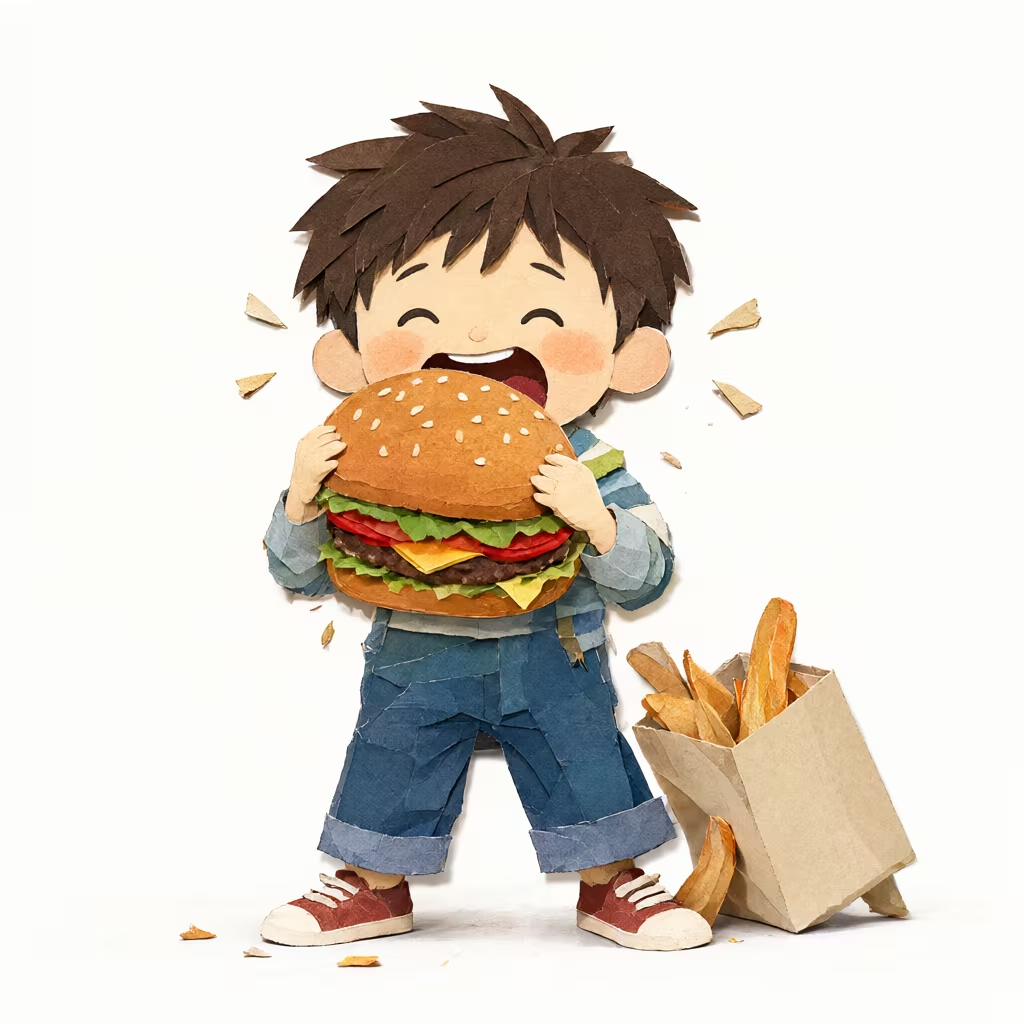
Qwen-Image-2.1, seed 42. Paper fibers, visible cut edges, layered shadows, a complete figure and a second prop.
Qwen-Image-2.1 produced the most complete answer. The boy is a full-body cutout with separate paper layers for hair, shirt, jeans, and shoes; the fries bag adds a second silhouette without taking over. The paper texture reads as fiber rather than a flat noise overlay, and the drop shadows between layers explain the construction. The model also kept the burger contact believable, which is where several other outputs lost coherence.
This model's natural-language encoder suits the prompt. Qwen-Image-2.1 uses Qwen's own text encoder and an MMDiT backbone; the scene description is handled as a paragraph, which is the input style the template provides. ComfyUI release overview · Comfy-Org model card
I used 45 steps with CFG 1.0. That is slower than the distilled models but still under half a minute for one 1024 × 1024 image here.
Krea-2 Turbo
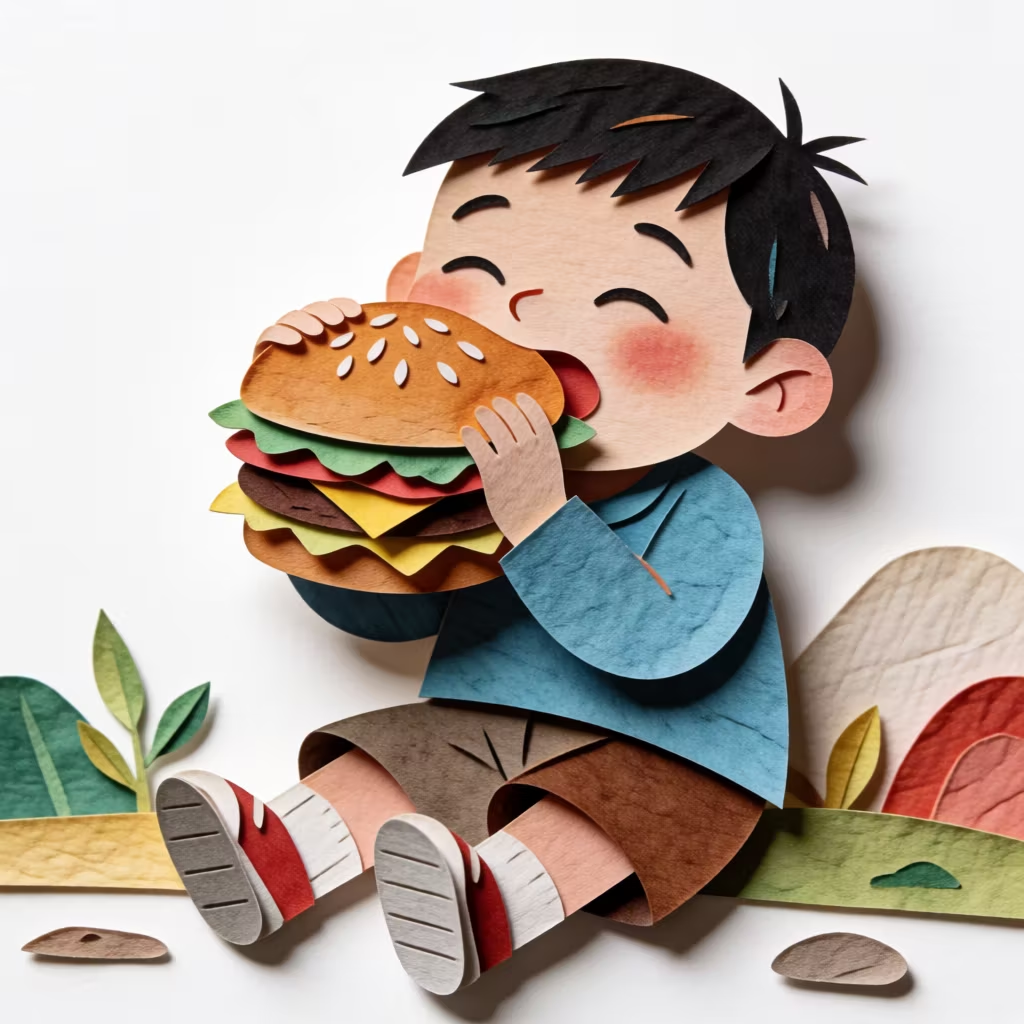
Krea-2 Turbo, seed 42. The strongest paper surface and the most staged composition in the set.
Krea-2 Turbo gave the strongest tactile result. The paper has visible grain and creases, and the cut edges carry a slight thickness that makes the layers feel physical. It also made a compositional decision the prompt did not ask for: the boy sits on the ground with plants and a rock formation around him. That reads as a paper diorama, and it is a good fit for the style, but the framing is tighter than the other outputs.
Krea-2 Turbo is a distilled model, and eight steps are enough. The ComfyUI Krea-2 guide documents the Turbo recipe as Euler/simple, 8 steps, CFG 1.0, without a sigma-shift node. ComfyUI Krea-2 guide
Z-Image Turbo
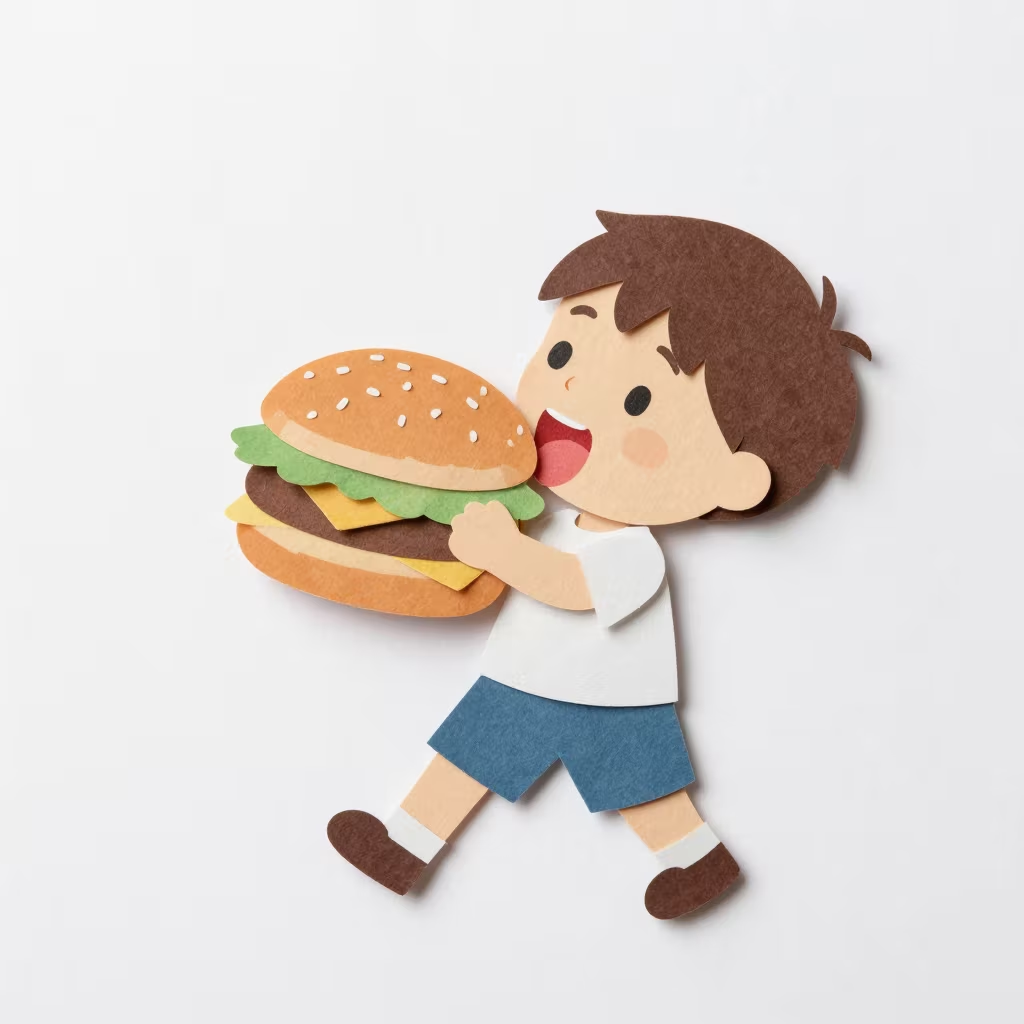
Z-Image Turbo, seed 42. The cleanest isolation and the least convincing hand contact.
Z-Image Turbo returned the cleanest product shot. The background is pure white, the figure is completely isolated, and the layer shadows are crisp. The weak point is interaction: the hand and the burger do not share a clear contact surface, so the burger reads as floating in front of the face instead of being held. The rest of the figure is well-proportioned and the paper-cut style is consistent.
Z-Image Turbo is a distilled model. The official recipe uses Euler/simple, 9 steps, CFG 1.0, with AuraFlow shift 3.0; the earlier seven-step UniPC configuration is not the documented Turbo setting. Z-Image repository
FLUX.2 Klein 9B
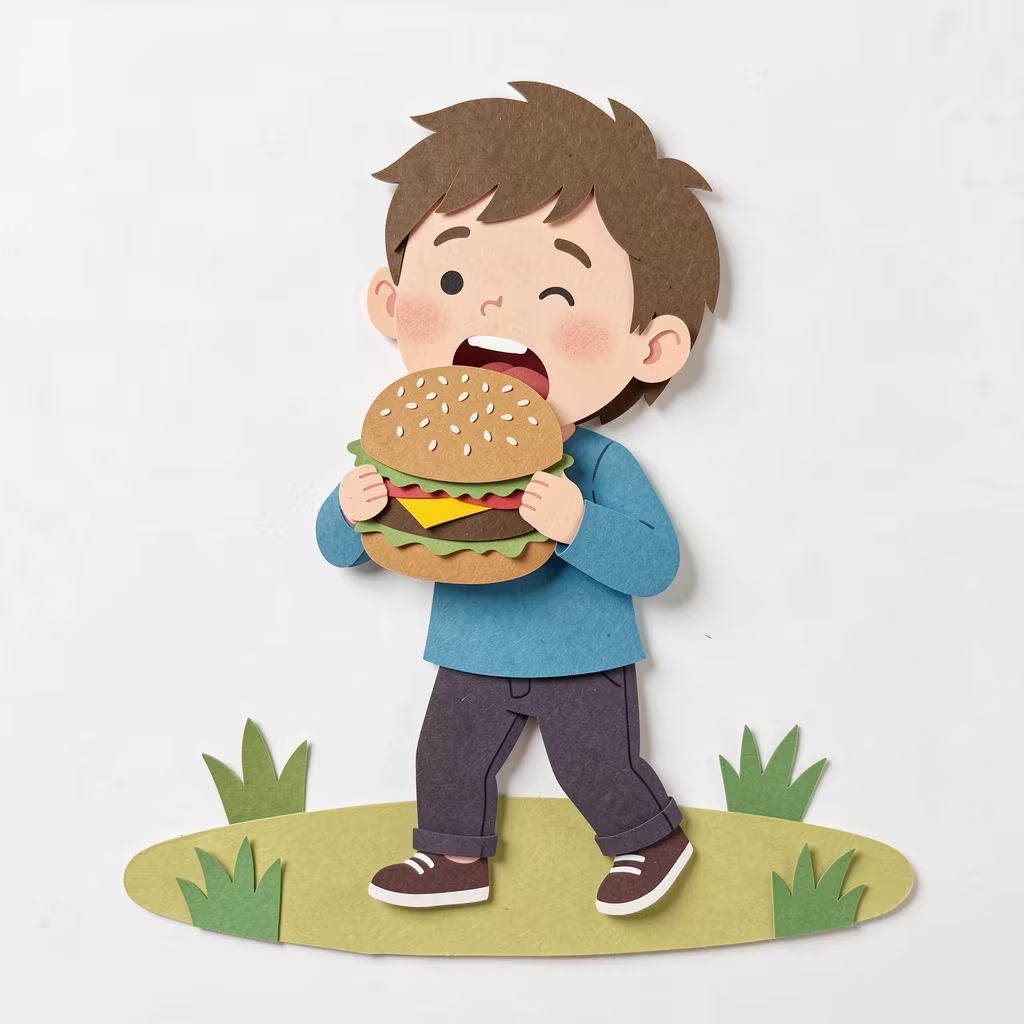
FLUX.2 Klein 9B Q8, seed 42. Calm palette, simple paper grass base, simplified hands and legs.
FLUX.2 Klein produced a balanced, slightly quieter image. The palette is restrained, the hair and shirt have clear paper separation, and the small grass base gives the character somewhere to stand without filling the frame. The anatomy is the tradeoff: hands are simplified and the legs are stiff compared with Qwen and Krea-2.
The local weight is a Q8_0 GGUF development build, not the official FP8 release. The FLUX.2 repository documents the model family; the quantization should be treated as a local runtime choice when reading these results. FLUX.2 repository
MOSS-Image
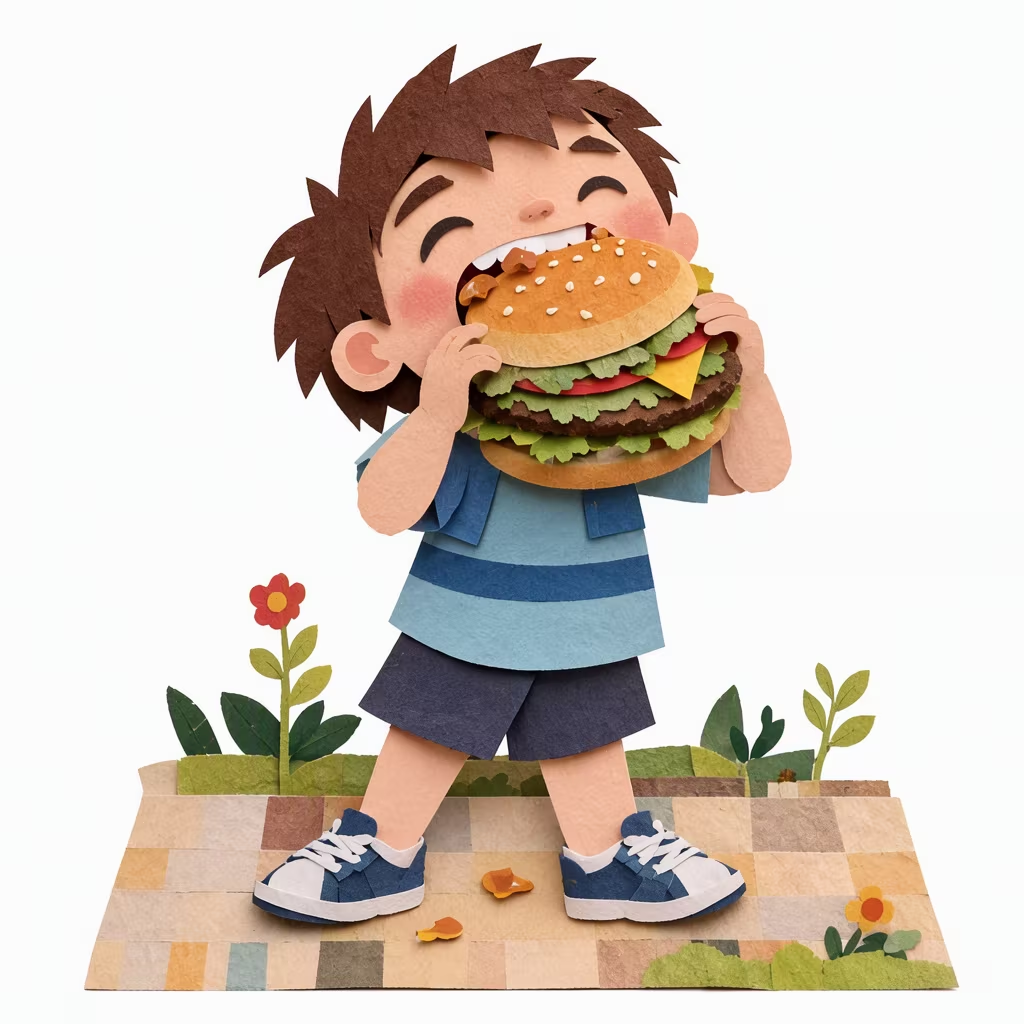
MOSS-Image, seed 42. Paper craft is clear, but the patchwork ground and flowers compete with the character.
MOSS-Image understood "paper" immediately: the boy, the burger, the patchwork ground, the flowers, and the little falling lettuce pieces all look cut from cardstock. The problem is hierarchy. The environment is nearly as detailed as the character, so the eye has to work to stay on the action. Hands are also simplified, and the expression is more caricatured than the other outputs.
I used the native 25-step ER-SDE recipe with the production workflow's default negative prompt. The optional SLG enhancement was left off. MOSS-Image repository · ComfyUI MOSS-Image guide
Anima Aesthetic v1.1
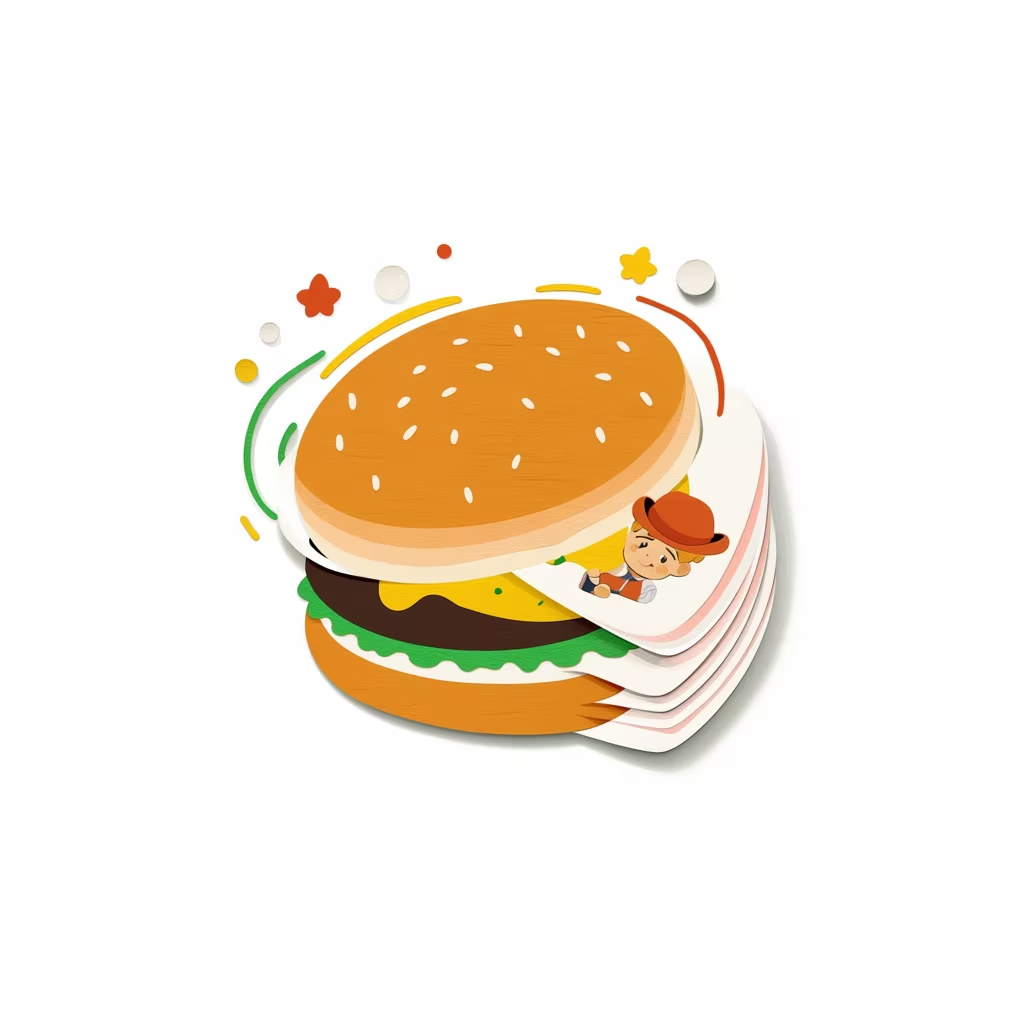
Anima Aesthetic v1.1, seed 42. The burger became the subject; the boy is a small figure on a paper layer.
Anima missed the assignment. It produced a large burger as the subject and placed a tiny boy inside the paper layers. The paper-craft surface is present, but the character is no longer full-body and the eating action disappears. This is not evidence that Anima is a weak image model; it is evidence that a tag-oriented anime model and a natural-language paper-cutout template are a poor prompt-format match.
Anima's model card describes training focused on anime and non-photorealistic illustration. Its weights are non-commercial, so this is an evaluation model unless its license fits the intended use. Anima model card
What the test shows
The style template transfers. Five of six models produced images a reader could identify as layered paper craft without seeing the prompt. The difficult part is not the paper look; it is following the subject and action while keeping the craft readable.
Qwen-Image-2.1 was the only model that delivered the complete scene—full figure, clear action, supporting prop, and coherent contact—without adding scenery or losing anatomy. That makes it the default for final paper-cutout stills on this machine.
Krea-2 Turbo and Z-Image Turbo are the fast exploration pair. Krea-2 is the better match when the paper texture itself is the point; Z-Image is better for isolated, clean-background cutouts. FLUX.2 Klein is a reasonable alternative when its palette and calmer composition are wanted. MOSS-Image is usable but needs more prompt control over the environment.
Anima needs a different prompt shape. A tag-led prompt and a shorter negative prompt would test it more fairly; this run tests the template, not the model.
Limits
These results come from one seed, one prompt fill, one GPU, and one ComfyUI installation. Each model used its documented native sampler and negative-prompt policy, so the comparison is not a controlled experiment with identical sampling parameters. A single image can also hide seed variance: a model that failed here may produce a strong result on another seed.
The images were reviewed visually, not scored in a human preference study. Timings include model loading and reflect this laptop, not a server. No LoRA, ControlNet, or image reference was used.
The practical reading is narrow and useful: on this setup, this paper-cutout template is ready to use with Qwen-Image-2.1, and Krea-2 / Z-Image Turbo are the fast options when the scene is simple enough.